When performance gets worse, the hardest part is not fixing it—it is being confident about what actually changed. Regressions are often diagnosed by intuition (“it must be the DB”), but intuition is unreliable when systems are layered and traffic is variable. A good workflow reduces guesswork by turning a regression into a series of narrowing questions.
This note provides a checklist that works for both web pages and backend services. It assumes you can measure a handful of percentiles (p50/p95/p99) and you can label requests by endpoint and region. Everything else is optional: deeper tracing makes the workflow faster, but the workflow still helps even with basic metrics.
Quick takeaways
- Confirm before you fixRule out instrumentation changes and population shifts first.
- Localise by phaseBreak the request into DNS/connect/edge/origin/DB rather than staring at a single number.
- Percentiles matterA p99 regression often indicates contention/queueing; a uniform shift suggests added work.
- Bisect changesIf you cannot name a concrete change window, you will chase the wrong causes.
- Mitigate while learningIn incidents, stabilise first (reduce demand, cap concurrency), then perform deeper root cause analysis.
Problem framing (why it matters)
Performance regressions hurt twice: they degrade user experience, and they increase operational load (more retries, more timeouts, more support). In distributed systems, a small latency increase can trigger timeouts and retries that amplify load and cause further latency.
The purpose of a checklist is to preserve discipline under pressure. It forces you to answer simple questions in the right order. The win is not “following steps” but preventing premature commitment to a story.
Key concepts (definitions + mini examples)
Regression types
- Uniform shiftAll percentiles shift similarly. Often indicates added work or a slower dependency for everyone.
- Tail-only shiftp95/p99 worsen much more than p50. Often indicates queueing, contention, or partial failure behaviour.
- Segment-specific shiftOnly one region, endpoint, or client type worsens. Often indicates routing, cache, or config differences.
Practical checks (steps/checklist)
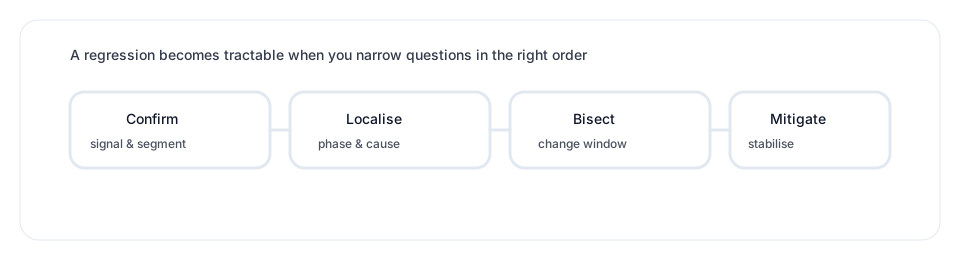
1) Confirm the signal
- Is it real?Check a second source. If you have both client and server metrics, compare them.
- Is it a measurement change?Did sampling, aggregation, or instrumentation timing change?
- Is it a population change?Traffic mix shifts can change percentiles even if underlying performance is stable.
2) Identify the affected segment
Narrow quickly. A regression that affects “all traffic” is rare; more often it hits one region, one endpoint, or one client type. Find the smallest segment where the regression is strong.
3) Localise by phase
If you have any phase timings (client-side connect/TLS, edge logs, origin timings), use them. Otherwise, use indirect clues: cache hit/miss patterns, response size changes, or dependency latency changes.
- Connection-related?DNS/TCP/TLS increases suggest routing or connection reuse changes.
- Edge/cache-related?More misses or different cache keys shift TTFB and origin load.
- Origin-related?Increased origin time suggests added work, slower dependencies, or queueing.
4) Decide: queueing or added work
Use the percentiles. Queueing inflates the tail disproportionately; added work tends to shift the whole distribution. Correlate with utilisation and concurrency: if high load coincides with worse tail, queueing is likely.
5) Bisect the change window
A regression often comes from a deploy, a config change, a cache policy update, or a traffic-routing shift. Put concrete timestamps on those events, then test hypotheses in that window.
6) Mitigate safely
If the regression is active and harming users, mitigation can be separate from root cause. Useful mitigations include: rolling back a change, reducing feature load, increasing cache TTL temporarily, or applying rate limits to stabilise the origin.
Common pitfalls
- Starting with the most complex hypothesisBegin with “is it real, is it segmented, which phase changed?” before deep dives.
- Ignoring percentilesRegressions hide in the tail; p99 is often where incidents begin.
- Changing multiple knobs at onceIt becomes impossible to learn what mattered.
- Optimising while unstableIf the system is in overload, stabilise first; otherwise the signal keeps moving.
- Missing cache regressionsA hit ratio drop can look like an origin regression but needs a different fix.
Related notes
- TTFB and origin latencyA guide for localising regressions to connection, edge, or origin.
- Cache hierarchy: edge to originA cache policy or key change is a common regression source.
- Queueing basics and latency budgetsUse queueing signatures to detect overload vs added work.
- Observability for distributed systemsCorrelation helps confirm phase changes and causal links.